影片轉提示詞

影片轉提示詞

上傳一段短片或單張圖片,取得為 Sora、Veo、Kling 或 Runway 撰寫的影片提示詞:鏡頭、動態、光線與節奏一應俱全。

加入一段短片,系統會在你的瀏覽器中擷取四個畫格——影片本身不會離開你的裝置。或加入單張圖片以取得圖生影片提示詞。

或圖片網址
請使用可直接公開存取的圖片連結。
消耗 1
你的結果
See what you can makeExplore an example while you get started.
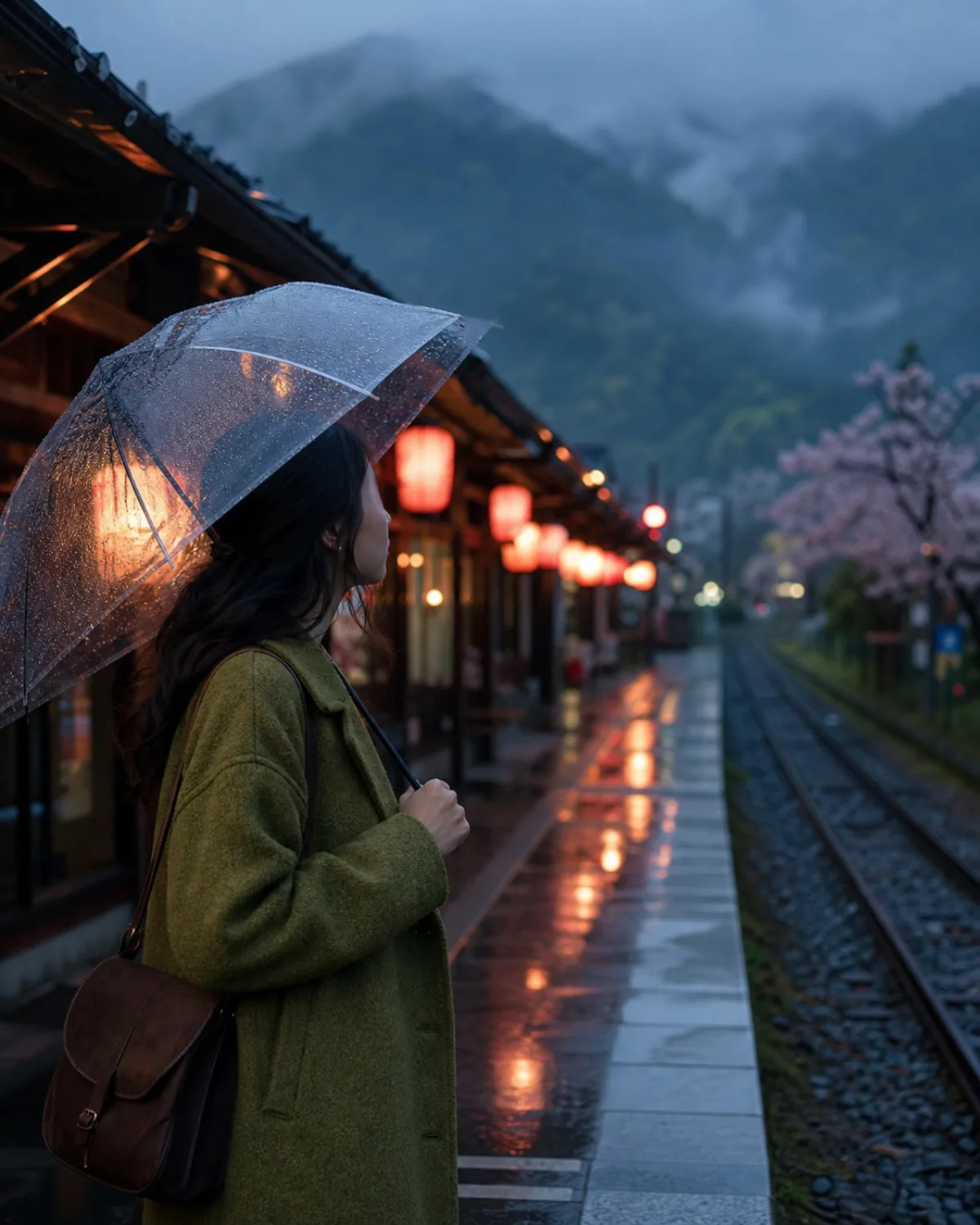
Portrait on a rainy Kyoto train platform
IMAGE TO VIDEO PROMPT · SORA 2

Slow push-in on a woman holding a transparent umbrella on a rain-washed Kyoto platform at blue hour. Rain streaks the frame; she turns her head toward an arriving train whose warm headlights sweep across wet paving. 0–4s: static medium shot, rain and steam drifting. 4–8s: the camera eases forward as the train enters from the right. Audio: soft rain, distant announcement chime, train brakes.

EXAMPLE WORKFLOW

從一個畫格,到 一段動態鏡頭。

靜態畫面與影片片段,變成能說明什麼在動、鏡頭往哪裡走,以及這個鏡頭持續多久的影片提示詞。

視覺參考Woman with a transparent umbrella on a rainy Kyoto train platform
AI result

Slow push-in on a woman in a moss-green wool coat holding a transparent umbrella on a rain-washed Kyoto platform at blue hour. 0–3s: static medium shot, rain streaking the frame, coral lanterns reflected in wet paving. 3–8s: the camera eases forward as a train enters from the right and its warm headlights sweep across her face; she turns toward it. Cool ambient light against warm practicals, 35mm film texture, quiet cinematic mood. Audio: steady rain, a distant platform chime, train brakes hissing.

圖片轉影片提示詞・SORA 2

為一張靜態人像賦予動態鏡頭。

圖片提供了主體、光線與氛圍。提示詞則加上 Sora 所需的運鏡、動作與時間節奏。

Read result

Slow push-in on a woman in a moss-green wool coat holding a transparent umbrella on a rain-washed Kyoto platform at blue hour. 0–3s: static medium shot, rain streaking the frame, coral lanterns reflected in wet paving. 3–8s: the camera eases forward as a train enters from the right and its warm headlights sweep across her face; she turns toward it. Cool ambient light against warm practicals, 35mm film texture, quiet cinematic mood. Audio: steady rain, a distant platform chime, train brakes hissing.

試試 Video to Prompt
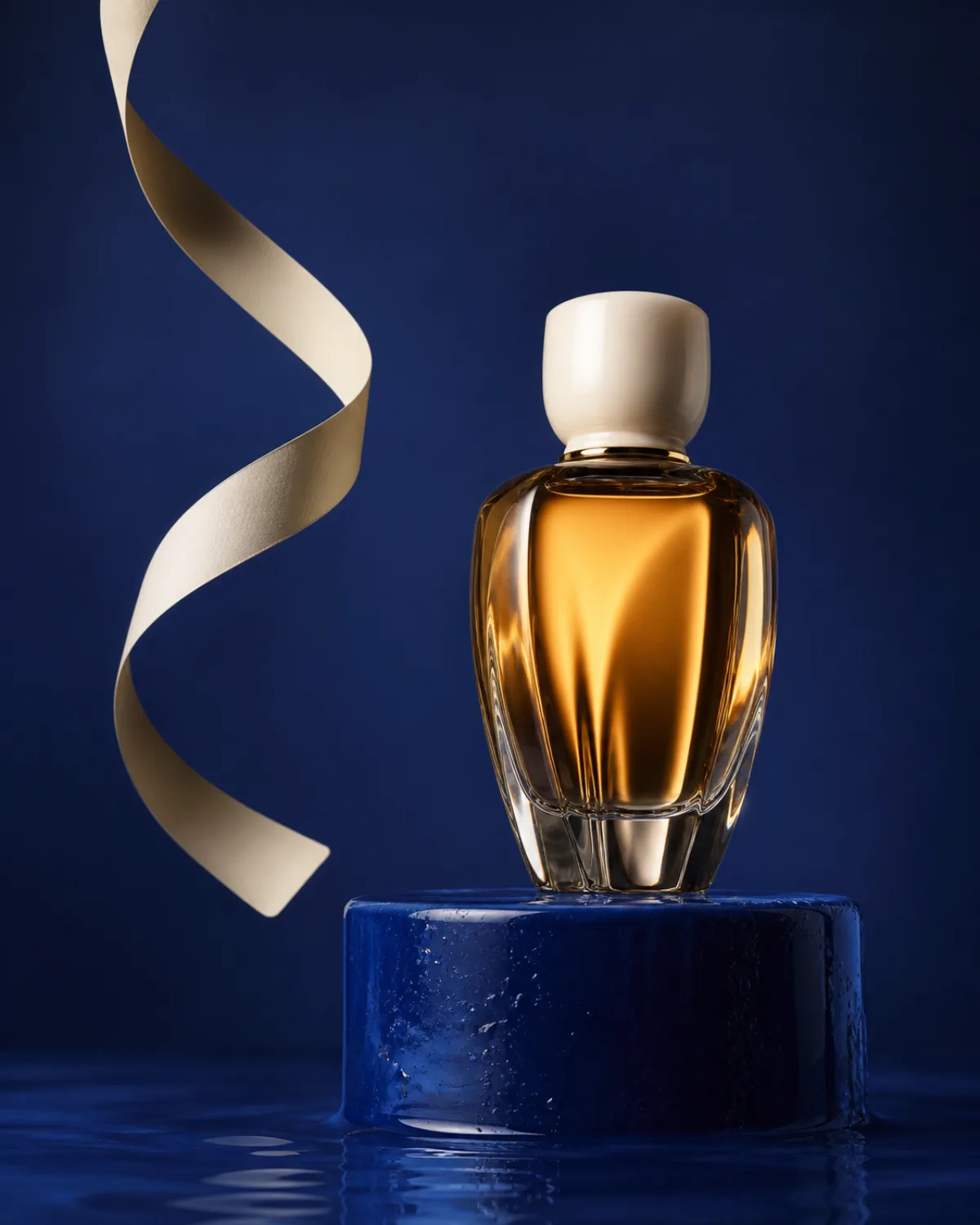
視覺參考Amber perfume bottle on a cobalt blue plinth
AI result

A slow 180-degree orbit around a translucent amber perfume bottle on a wet cobalt-blue plinth, macro lens feel with shallow focus. As the camera circles, a softbox highlight glides across the glass and the ivory cap; a pale paper ribbon lifts in a gentle breeze and settles; faint ripples spread across the plinth. Deep cobalt background, glass and satin textures, quiet luxury. Sound: a low airy studio tone and one soft water drip.

圖片轉影片提示詞・VEO 3

把一張商品照變成環繞運鏡鏡頭。

當提示詞說出環繞方式、光線的行為,以及場景中一個微小的動作時,商品靜物照就能變成短短的主打鏡頭。

Read result

A slow 180-degree orbit around a translucent amber perfume bottle on a wet cobalt-blue plinth, macro lens feel with shallow focus. As the camera circles, a softbox highlight glides across the glass and the ivory cap; a pale paper ribbon lifts in a gentle breeze and settles; faint ripples spread across the plinth. Deep cobalt background, glass and satin textures, quiet luxury. Sound: a low airy studio tone and one soft water drip.

試試 Video to Prompt
取樣的影片畫格A giant tortoise carrying an observatory crosses a moonlit meadow (4 frames)
AI result

A giant tortoise carrying a small brass-and-wood observatory walks slowly through a moonlit wildflower meadow; the flowers sway as it passes and warm light flickers in the observatory windows. Wide shot, slow tracking camera moving left to right at the tortoise's pace. Hand-painted gouache storybook style, indigo sky with drifting clouds, silver moonlight, calm and wondrous.

影片轉提示詞・KLING

從影片片段中讀出動作。

工具從四張取樣畫格中讀出主體的動作與鏡頭運動,再以 Kling 精簡的順序寫出來。

Read result

A giant tortoise carrying a small brass-and-wood observatory walks slowly through a moonlit wildflower meadow; the flowers sway as it passes and warm light flickers in the observatory windows. Wide shot, slow tracking camera moving left to right at the tortoise's pace. Hand-painted gouache storybook style, indigo sky with drifting clouds, silver moonlight, calm and wondrous.

試試 Video to Prompt

寫下動作,而非畫面

影片轉提示詞 生成器如何運作

圖像提示詞描述的是一個凝結的畫格。影片提示詞則必須描述變化:主體在接下來的八秒內做了什麼、鏡頭如何移動、光線如何變化,以及每個節拍發生的時間點。這款工具會從影片片段中讀出這樣的變化,或從單一圖片推論出來,再以你的影片模型能理解的語法寫出來。

三個步驟從影片中萃取提示詞

  1. 加入一段影片或一張圖片。 上傳最長 60 秒的 MP4、WebM 或 MOV 檔案;系統會在你的瀏覽器中取樣四個畫格。或加入一張圖片,取得圖生影片提示詞。
  2. 選擇模型與時長。 選擇 Sora 2、Veo 3、Kling、Runway Gen-4 或 General,設定目標長度,並加入可選的方向指示,例如「緩慢推進」或「保留雨景」。
  3. 生成、貼上、調整。 把提示詞複製到你的影片生成器中。如果動作是對的,但鏡頭太寬,就改變一項指令並重新執行。

提示詞從你的畫格中讀出了什麼

畫格會依時間順序取樣,讓工具能夠比較它們:畫格之間縮小的主體暗示著鏡頭拉遠,傾斜的地平線暗示手持運鏡,掃過臉部的光源則暗示有一輛經過的車或一個轉頭的動作。它會說出鏡頭尺寸、鏡頭高度與角度、主體的動作及其進展、場景、時間與天氣、光線的方向與特質,以及色調與風格特徵。

接著,它會以動作的形式撰寫提示詞。每一句話都在說明什麼在動,包括鏡頭本身。風格會被保留而非升級:帶顆粒感的手機錄影,除非你另外要求,否則仍會維持帶顆粒感的手機錄影效果,因為這通常正是萃取這則提示詞的目的所在。

圖生影片提示詞:讓靜態畫面動起來

只有一張圖片時,沒有動作可供讀取,因此工具會從畫面中推論出一個合理的動作:人像會得到緩慢的推進與一個小動作,商品會得到環繞運鏡與一項移動的元素,風景則會得到緩慢的移動與天氣變化。你的指示會覆蓋以上所有推論。「她抬頭微笑」或「靜止鏡頭,只有水在動」,這樣的句子,才能讓一則圖生影片提示詞真正屬於你。

提示詞會保留圖片已經決定的內容。主體、構圖、光線與色調都會被描述出來,讓影片模型的第一個畫格與你的圖片相符,這正是 Sora、Veo、Kling 與 Runway 的圖生影片模式,為了忠實呈現參考圖片所需要的資訊。

Sora 2、Veo 3、Kling 與 Runway 讀取提示詞的方式各不相同

同一個構想必須用五種方式寫出來。Sora 2 與 Veo 3 會生成聲音,因此它們的提示詞會以一句音訊描述結尾;Kling 著重主體與單一明確的動作;Runway 則希望先寫出鏡頭運動,並使用它自己的用語。在工具中選擇模型後,提示詞就會依循這些規則撰寫。

影片模型提示詞的撰寫方式音訊長度
Sora 2純文字敘述;當有多個節拍時,附上包含時間點的簡短鏡頭清單是,原生音訊:以一句聲音或對白作結約 180 字以內
Veo 3一段電影感的段落:鏡頭、動作、環境、光線、風格是:加入一句音效設計描述,對白以引號標示約 160 字以內
Kling主體 → 動作 → 場景 → 鏡頭 → 光線,一個明確的主要動作60–110 字
Runway Gen-4先寫鏡頭運動(推進、環繞、跟拍、升降),再寫主體動作約 80 字以內
General跨模型敘述:鏡頭與運鏡、主體動作、場景、風格、時長可選90–160 字

誰在使用影片提示詞生成器

創作者與行銷人員把一張商品照或行銷活動的靜態畫面,變成一段短短的主打影片,而不需要從零開始撰寫鏡頭語言。電影工作者與剪輯師從一段參考鏡頭中萃取提示詞,在 Sora 或 Veo 中重現它的動作與光線。社群團隊用一個新主體,重現一段表現良好的影片節奏。提示詞工程師以模型專屬的格式作為起點,比較 Sora 2、Veo 3 與 Kling 如何詮釋同一個鏡頭。

隱私、限制與費用

你的影片不會被上傳。你的瀏覽器會以縮小的尺寸取樣四個畫格,僅分析這些畫格;你提交的任何內容都不會被加入畫廊,也不會顯示給任何其他人。片段限制為 60 秒與 60 MB,這已足夠處理單一鏡頭,並讓分析保持快速。每次執行需花費 2 點數,是圖像工具的兩倍,因為它需要讀取多個畫格,並撰寫一則更長、含時間資訊的提示詞。

需要的是一張靜態圖片背後的提示詞嗎?使用 Image to Prompt。從文字開始?Text to Prompt 能為你擴展文字內容,而 Image Prompt Gallery 則依風格展示完成的提示詞。

COMMON QUESTIONS

Video to prompt FAQ

什麼是影片轉提示詞生成器?

它會讀取一段短影片或一張靜態圖片,並寫出能在 AI 影片生成器中重現該鏡頭的文字提示詞。提示詞描述的是什麼在動:主體的動作、鏡頭運動、光線、節奏與時長,並依 Sora、Veo、Kling 或 Runway 最容易理解的格式撰寫。

我該如何從影片中萃取提示詞?

上傳一段最長 60 秒的 MP4、WebM 或 MOV 片段。你的瀏覽器會在整段片段中取樣四個畫格並送出分析;影片檔案本身永遠不會離開你的裝置。選擇影片模型與目標時長,加入可選的方向指示,然後點擊「生成」。把較長的影片剪輯成你想要生成提示詞的單一鏡頭。

我可以改用一張圖片生成影片提示詞嗎?

可以。加入一張圖片,工具就會寫出一則圖生影片提示詞:它會保留圖片的主體、構圖、光線與風格,並加上影片模型讓畫面動起來所需的動作、鏡頭運動與時間節奏。這正是 Sora、Veo、Kling 與 Runway 的圖生影片模式所需要的輸入方式。

它能撰寫 Sora 2 提示詞嗎?

可以。選擇 Sora 2,提示詞會以純文字敘述撰寫;當動作有多個節拍時,會附上一份簡短的鏡頭清單,每個節拍都標有以秒為單位的時間,並在結尾加上一句音訊描述,因為 Sora 2 會生成同步的聲音。

那 Veo 3、Kling 與 Runway 呢?

每一種都有自己的選項。Veo 3 會取得一段附有音訊描述的電影感段落;Kling 會取得依「主體、動作、場景、鏡頭、光線」順序排列的精簡提示詞;Runway Gen-4 會取得一則以 Runway 自身用語、先寫鏡頭運動的簡短提示詞。選擇 General,可取得適用於各模型的提示詞。

它能還原一段 AI 影片背後確切的提示詞嗎?

沒有任何工具能從一段完成的影片中讀出隱藏的提示詞。它所做的,是精確描述可見的動作、鏡頭、光線與風格,讓你再次執行這則提示詞時,能產生同類型的鏡頭。

影片轉提示詞工具是免費的嗎?

你可以在每日免費額度內,不建立帳號使用它。在付費方案中,每次執行需花費 2 點數,因為它需要讀取多個畫格,並寫出比圖像工具更長的提示詞。

哪些影片檔案格式可以使用?

最長 60 秒、最大 60 MB 的 MP4、WebM 與 MOV,以及 JPG、PNG 與 WEBP 圖片。由於畫格是在你的瀏覽器中讀取,非常舊的瀏覽器可能無法支援每一種編碼;如果片段無法載入,請將它匯出為 MP4(H.264)格式後再試一次。